Japanese & Chinese OCR Benchmark
Japanese and Chinese OCR evidence: dated July results and original current evaluation inputs with reviewed ground truth.
Current evaluation: September 10, 2026
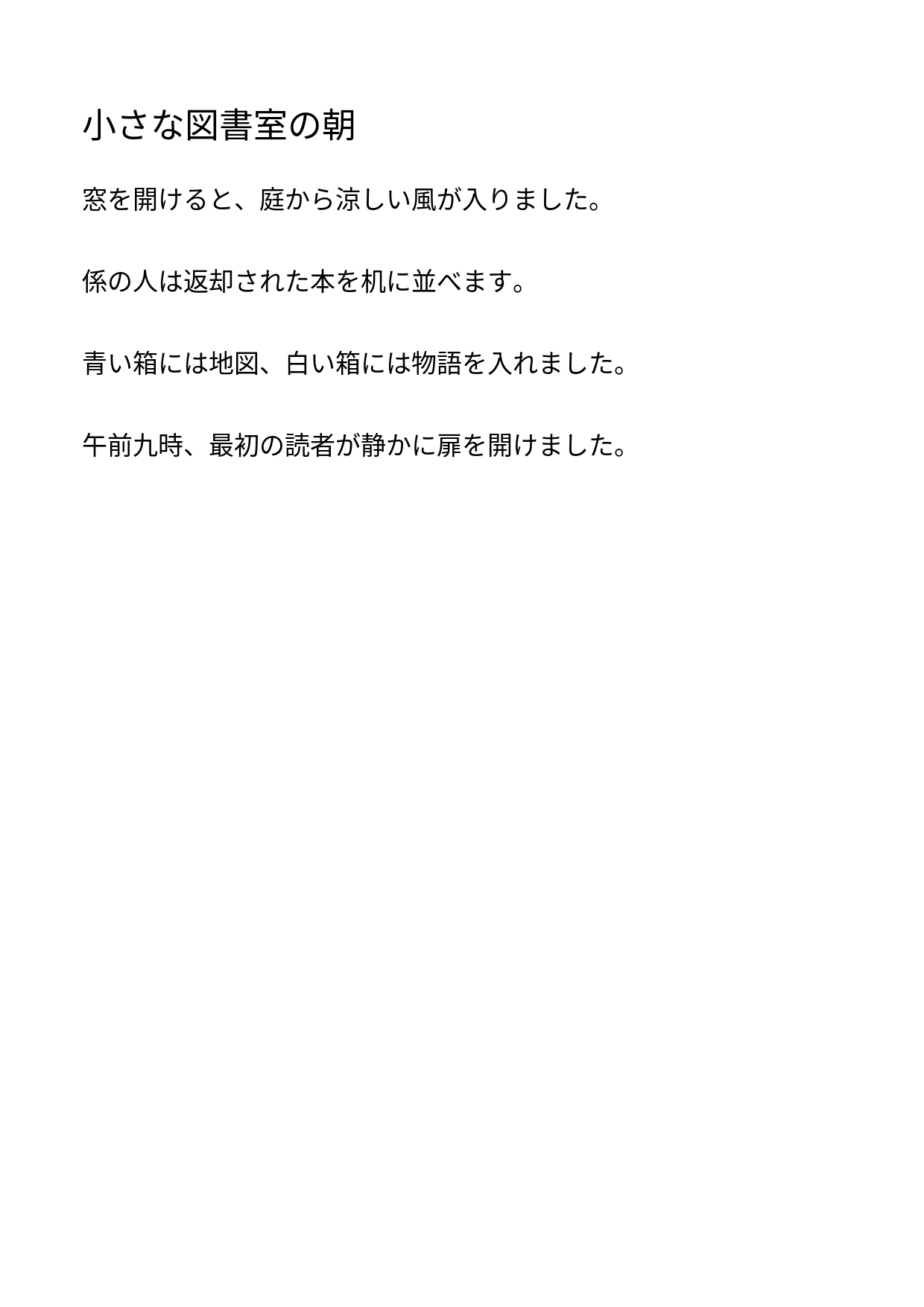
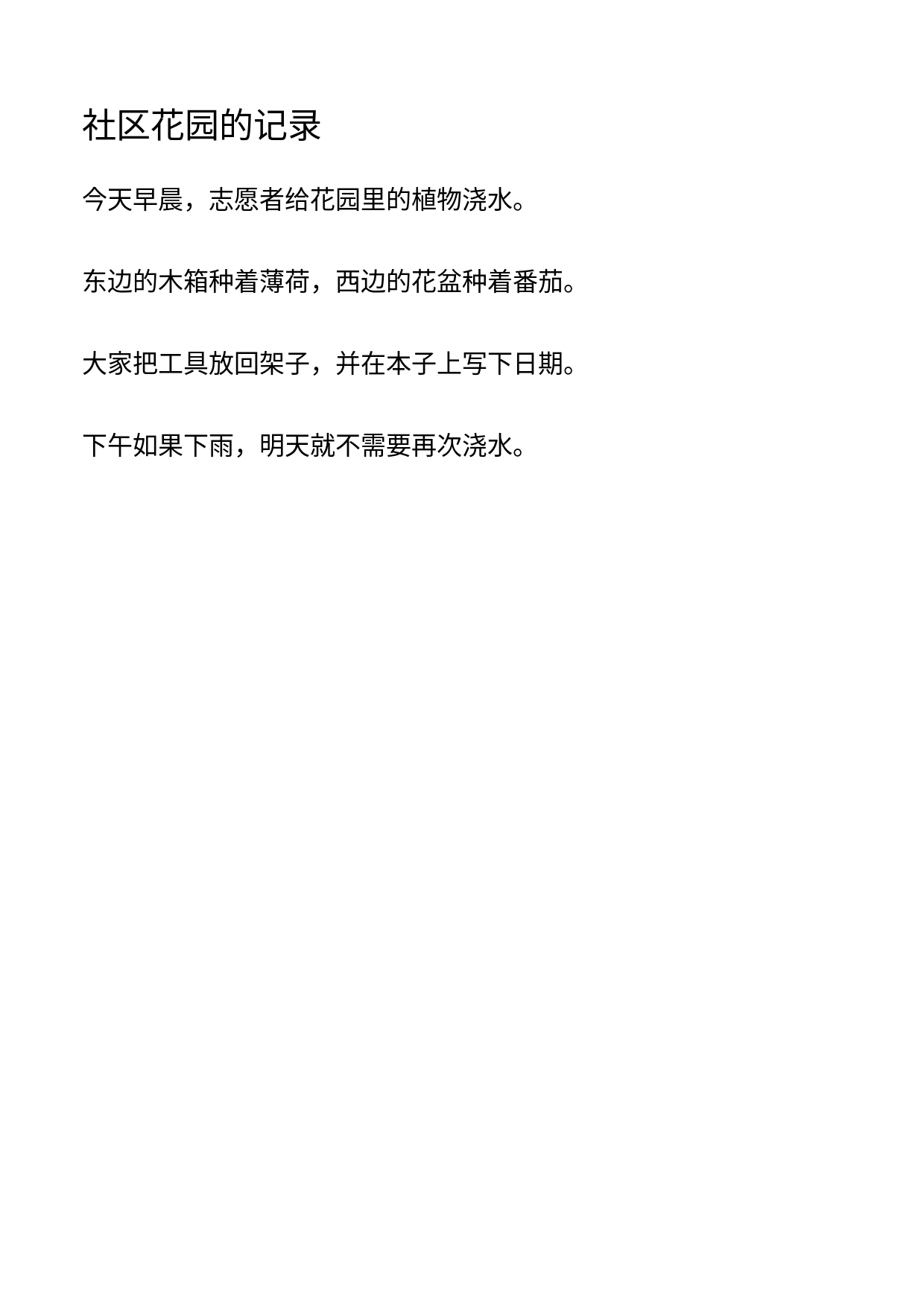
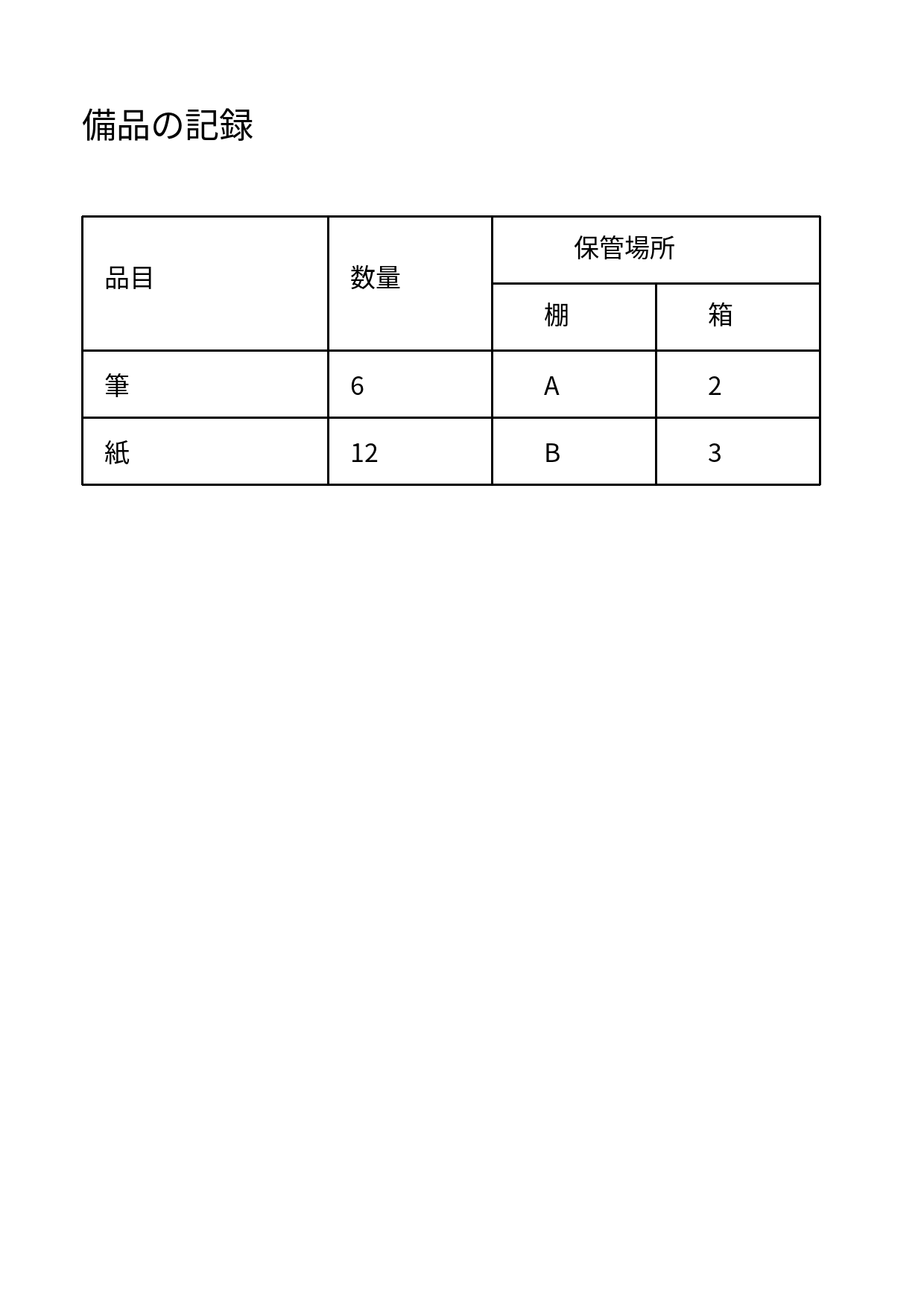
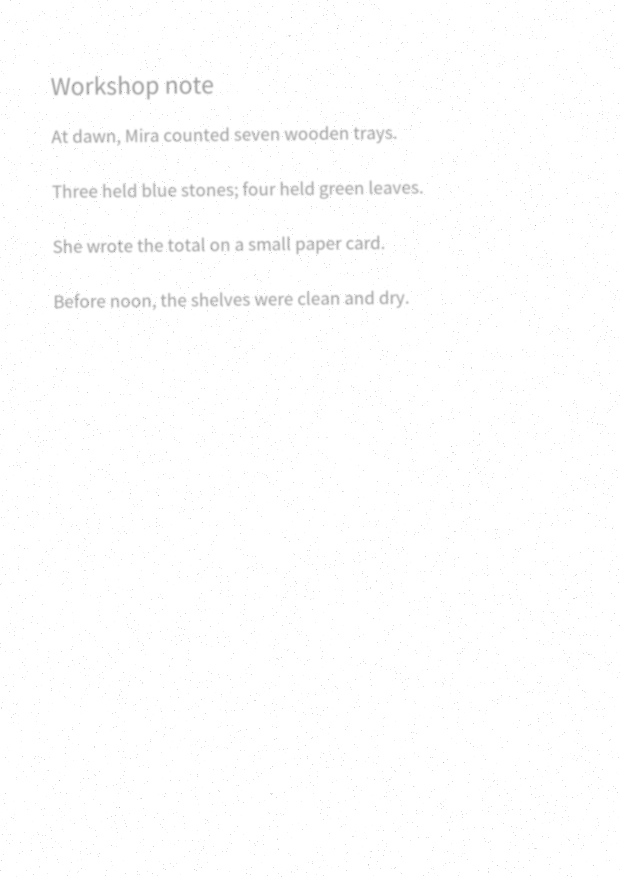
Current OCR quality remains unmeasured. The first public-demo request returned HTTP 403 without an OCR result or observed model, so collection stopped. CER, table correctness and aggregate timings remain unknown. Inspect the 4 original one-page scans below or the separate current invoice capture.
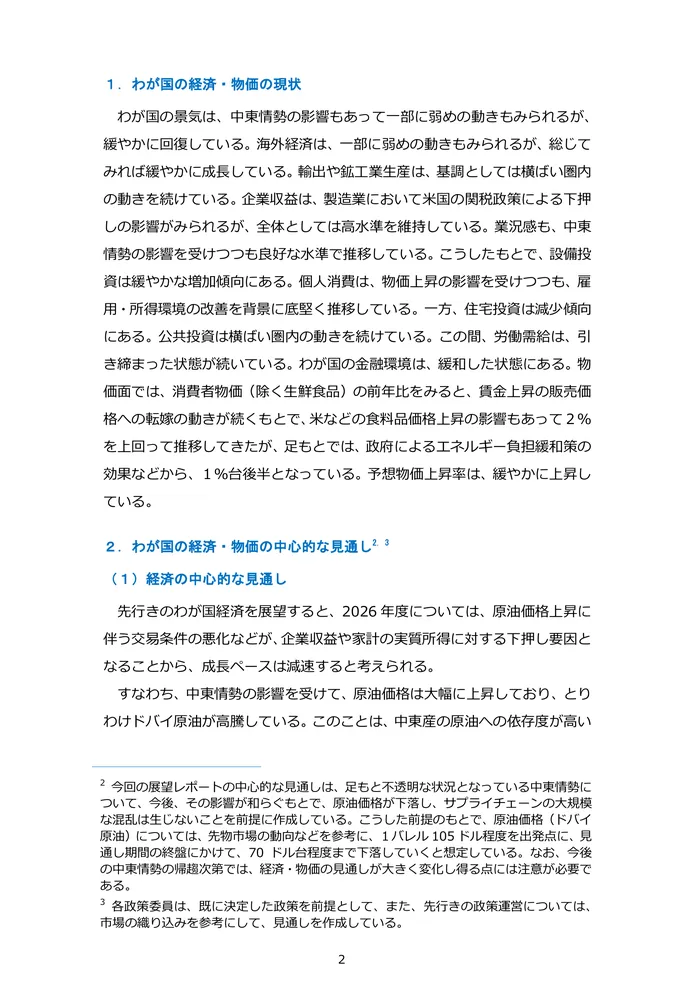
- Japanese prose — source PDF, page image and ground truth. HTTP 403; no output.
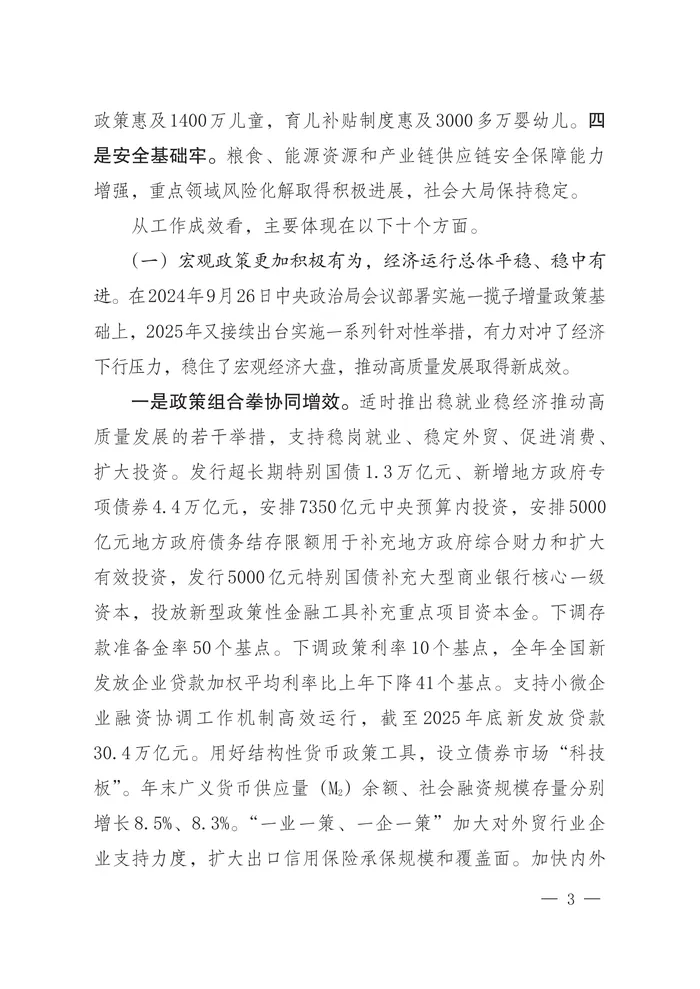
- Chinese prose — source PDF, page image and ground truth. Not attempted.
- Merged table — source PDF, page image and ground truth. Not attempted.
- Degraded scan — source PDF, page image and ground truth. Not attempted.
Method and failed attempt
Ground truth was independently reviewed before collection. Of 3 planned repetitions per case, 1 of 12 attempts was used and 11 were not attempted. The evaluation record, attempt ledger and complete sanitized response retain the failure. Its elapsed time is not OCR latency.
The body reports error code: 1010, which Cloudflare identifies as browser-signature access denial. This limits the tested client path; it does not establish that all clients fail. See the operational follow-up before a separately reviewed future run.
The frozen protocol specifies normalized text CER and separate table-cell/span checks. With 3 repetitions, nearest-rank p95 would be only the largest observation. This tiny synthetic corpus cannot establish language-wide quality or a competitor ranking.
The input hashes and versions pin image-only PDFs with no text layer. Original text and artwork are CC0; the generator rasterizes the Noto font under its SIL license. Requests include raw output to identify the actual model. That option and the original bytes are ineligible for the service sample cache under inspected code; public cache headers are unavailable and provider-internal caching remains unknown.
Historical run: PaddleOCR, July 2026. These results compare the earlier pdfToMarkdown processor with Tesseract 5.5.1 and plain text extraction on identical inputs. Current Mistral OCR 4.1 evidence.
Test set
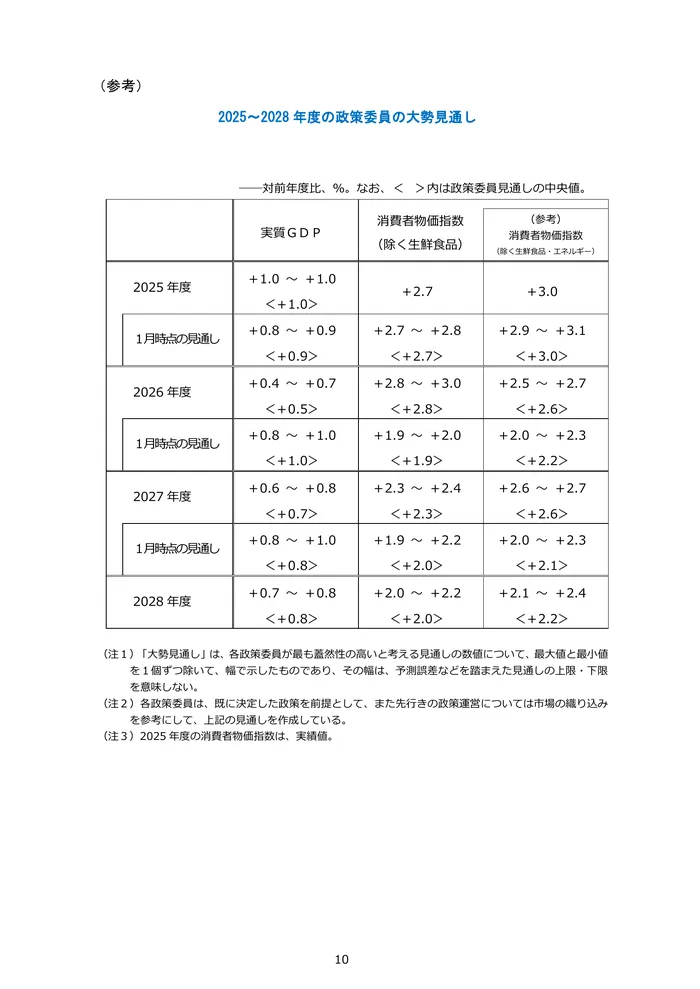
Three pages from two real, publicly available documents. To make this a true OCR test, each page was rasterized at 200 DPI and re-embedded as an image-only PDF — a simulated scan with no text layer (verified: 0 extractable characters).
- JA prose — Bank of Japan, Outlook for Economic Activity and Prices, April 2026, page 2. Dense Japanese paragraphs, section headings, two footnotes.
- JA table — same document, page 10: the Policy Board members' forecast table (7 rows × 4 columns of ranges and medians).
- ZH prose — National Development and Reform Commission,2026 Report on National Economic and Social Development, page 3. Simplified Chinese prose with numbered headings.
Results: character accuracy
Character error rate (CER) against the original documents' digital text layer as ground truth — lower is better. Both texts were normalized identically before comparison (NFKC, all whitespace removed, markdown/HTML syntax and the demo watermark stripped); distance is Levenshtein.
| Test case | Text-layer extraction | Tesseract 5.5.1 | pdfToMarkdown |
|---|---|---|---|
| JA prose (1,015 chars) | nothing (0 chars — scans have no text layer) | 0.99% (10 errors) | 0.10% (1 error) |
| ZH prose (616 chars) | nothing | 0.97% (6 errors) | 0.00% (0 errors) |
The error types matter as much as the counts: Tesseract's errors are wrong characters in real words — it read 婴幼儿 (infants) as 枫幼儿 and 影響もあって as 影響もああって. Those survive spell-check, poison search indexes, and mislead LLMs reading the text downstream. pdfToMarkdown's single error across both pages was a footnote-marker punctuation difference (2,3 → 2.3).
Results: structure
CER only measures characters. For RAG and document automation the harder problem is structure — and on the forecast-table page the difference is not a percentage, it's usable vs not. Tesseract (raw output, excerpt):
2025<2028 年度の政策委員の大勢見通し

対前年度比、9%%。なお、く >内は政策委員見通しの中央値。

実質GD P         消費者物価指数          (参考
コ       消費者物価指数
(除く生鮮食品)     (只く生鮮食品・エネルギー)
+1.0 て +1.0

2025 年度                          +2.7            +3.0
ぐ+1.0>

1 月時点の見周し   +0.8
Column headers merge into free-floating lines, values detach from their rows, and <> brackets becomeく > / ぐ >. There is no reliable way to reconstruct which number belongs to which year. pdfToMarkdown returned the same page as a complete table (excerpt, abridged with …):
# 2025~2028年度の政策委員の大勢見通し
<table>
<tr><td></td><td>実質GDP</td><td>消費者物価指数(除く生鮮食品)</td><td>…</td></tr>
<tr><td>2025年度</td><td>+1.0 ~ +1.0 <+1.0></td><td>+2.7</td><td>+3.0</td></tr>
<tr><td>1月時点の見通し</td><td>+0.8 ~ +0.9 <+0.9></td><td>+2.7 ~ +2.8 <+2.7></td><td>…</td></tr>
<tr><td>2026年度</td><td>+0.4 ~ +0.7 <+0.5></td><td>+2.8 ~ +3.0 <+2.8></td><td>…</td></tr>
…
</table>
(注1)「大勢見通し」は、各政策委員が最も蓋然性の高いと…All 28 cells present, every range and median attached to the right year and column, headings and the explanatory footnotes preserved around it. The JA prose page likewise came back with its section headings as markdown## headings and both footnotes intact — Tesseract returns flat text with no structure.
Published results for the underlying model
This historical benchmark used PaddleOCR-VL-1.5. The retained PaddleOCR provider guide and officialmodel card provide the weights and license, and we've written before about why we built on this model family. The API results above were measured on v1.5. Version 1.6 is architecture-compatible and scores higher on OmniDocBench per its authors, but the measured CJK numbers on this page remain labeled with the version actually tested.
- 96.33% overall on OmniDocBench v1.6 — reported by the model authors in thePaddleOCR-VL-1.6 technical report (June 2026). OmniDocBench is a third-party document-parsing benchmark from OpenDataLab spanning hundreds of real pages — books, papers, financial reports, newspapers, and exams — including many Chinese-language documents, which is exactly the regime this page is about.
- Real5-OmniDocBench (same report) — a robustness evaluation on physically degraded inputs: real scans, skew, warping, screen photographs, and uneven illumination. Relevant here because our test above uses clean 200 DPI rasterizations; the published results cover the messy cases ours doesn't.
Attribution matters: those scores are reported by the model's authors (Baidu), on the model in isolation. Our API wraps the model in a conversion pipeline (PDF rasterization, page handling, markdown assembly), so end-to-end behavior is what the measured test at the top of this page checks. The published numbers and our hands-on run are separate evidence.
Methodology & limitations
- Single run per tool, one page per test case — this is a small, transparent sample, not a large corpus study.
- Scans were simulated (200 DPI rasterization). Real scanner artifacts (skew, noise, bleed-through) are not covered here.
- Ground truth is the original PDFs' digital text layer, itself imperfect around decorative characters; normalization details above.
- pdfToMarkdown was called through the public demo tier — the same thing you can run yourself, no cherry-picking a private build.
- Tesseract was run with default settings. Tuned PSM modes may do somewhat better on prose; they do not fix table structure.
- Raw outputs are archived and available on request via contact.
Reproduce it
Everything below runs on a stock machine with Homebrew (brew install tesseract tesseract-lang poppler, pip install pypdf pillow):
# 1. Get the source documents
curl -O https://www.boj.or.jp/mopo/outlook/gor2604a.pdf   # Japanese (pages 2, 10)
# Chinese: 2026 NDRC report (page 3) — see source link above

# 2. Simulate a scan: rasterize at 200 DPI, re-embed as image-only PDF
pdftoppm -f 2 -l 2 -r 200 -png gor2604a.pdf page
python3 -c "from PIL import Image; Image.open('page-02.png').convert('RGB').save('scan.pdf','PDF',resolution=200.0)"

# 3. Run the tools on the identical input
tesseract page-02.png out -l jpn                          # Tesseract 5.5.1
python3 -c "from pypdf import PdfReader; print(PdfReader('scan.pdf').pages[0].extract_text())"

base64 -i scan.pdf -o scan.b64                            # current API (Mistral OCR 4.1; new run)
python3 -c "import json,base64; print(json.dumps({'input':{'pdf_base64':open('scan.b64').read()}}))" > payload.json
curl -X POST https://pdftomarkdown.dev/v1/convert \
  -H "Authorization: Bearer demo_public_key" \
  -H "Content-Type: application/json" -d @payload.json
Try it on your own documents
The demo key used above works for anyone — no signup, page 1 of any PDF. Guides:日本語ページ · 中文页面 · API docs ·CLI (npx pdftomarkdown 書類.pdf).